Dubbing with 3 or 4 Voices: Dub a Scene Remotely, Each from Home
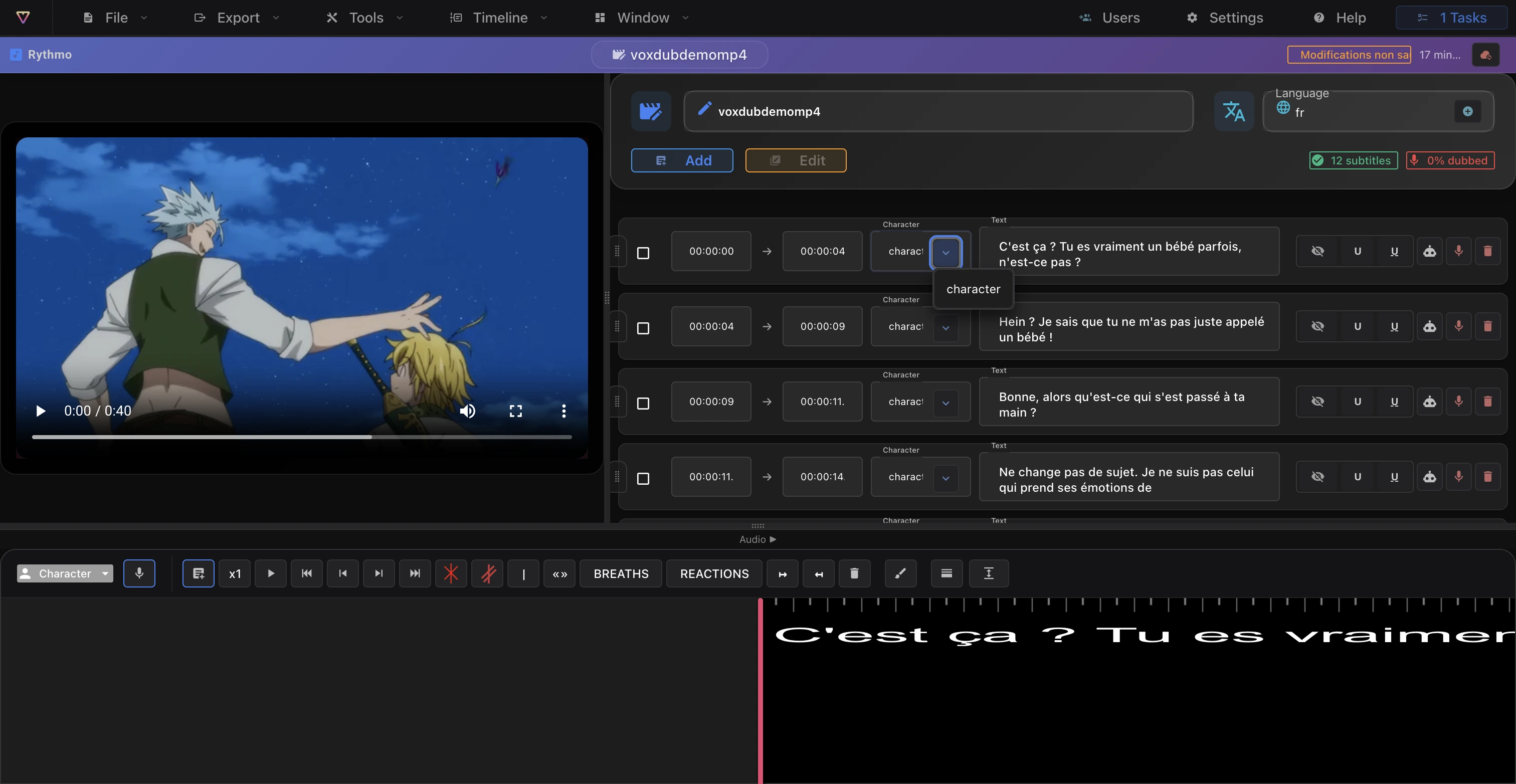
To dub a scene with 3 or 4 people remotely, prepare one rythmo band with one character per line, then each actor records their lines at home on the same project. You do not need a studio or a meeting: a browser, headphones and a microphone per person are enough. Here is the method in five steps.
Before you start: one project, one lead
Pick one person who creates the project, locks the final text and approves the takes. Without this role, everyone edits the text on their side and the lines stop answering each other. The lead prepares the band before the first recording session.
If you are only two, or if you dub alone, the method is in dub a scene with two voices or solo.
Step 1: prepare the rythmo band once
Import the video into Voxdub and tick Transcribe the dialogue: every spoken line is written on the band, aligned with the picture. Also tick Detect speakers so that a character is created for each voice in the scene. Then adapt the text, and freeze it. A text that changes after the first takes forces everyone to record again.
To understand how the band works, read what is a rythmo band.
Step 2: assign a character to each line
In the script panel, each line has a Character field. Type a name, and it becomes available for the other lines. Give each character its own text and badge colour in the editor settings: on the band, everyone spots their lines at a glance.
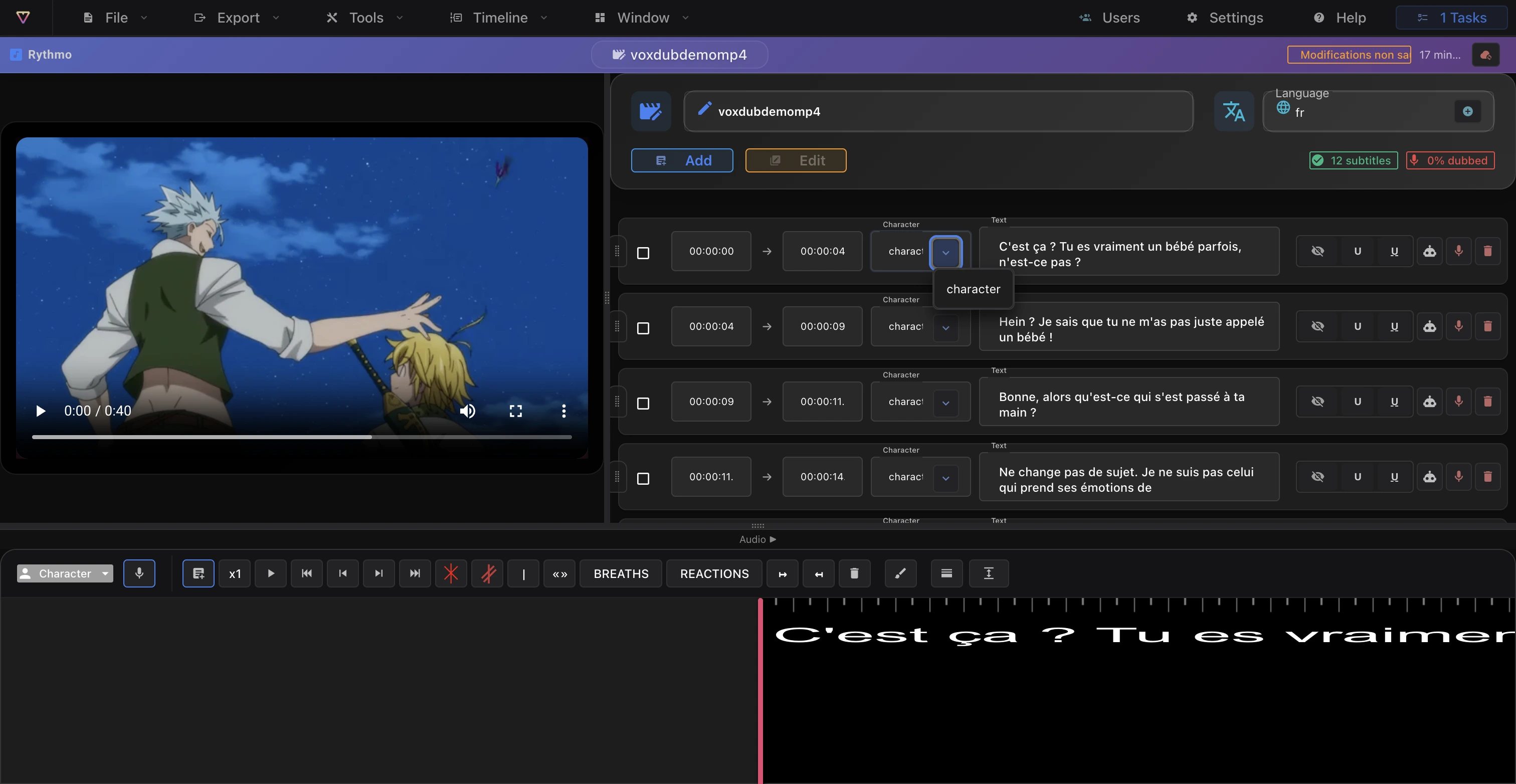
The details are in assign a character to a dialogue line.
Step 3: share the project with the other voices
Voxdub lets you invite other users to the open project. Open Users in the editor menu, enter the person's email under Invite by email, set the Access level to Editor, then click Send invitation. Each guest needs their own Voxdub subscription, and the invitation applies to that project. The full workflow is described on the dub a video online page.
Step 4: record track by track, each from home
Each actor opens the project, spots their lines by their character's colour and records them while following the band. A few rules so the voices blend well:
- Headphones are mandatory, so the video sound does not leak back into the microphone.
- Same distance to the mic for everyone: one hand's width between the mic and the mouth.
- Record in scene order. The character with the most lines starts. The others record next while listening to those takes, and the replies sound more natural.
- One take per line. Each take stays attached to its line and its character. To replace it, record again on the same line.
- Work in loops. Place one recording loop per actor or per scene for long sessions.
The recording controls are described in Record your voice.
Step 5: approve and export
The lead listens to the whole scene, asks for the retakes needed and runs Enhance your voice (Tools menu) for a noise reduction pass. Then export the dubbed video, or the BWF audio and the cue sheet if the mix is done in another application. The cue sheet is a session sheet built from the loops and the characters: it works as a checklist to confirm that no line was forgotten.
For a cartoon or an anime, the dub a cartoon page covers the full workflow.
Frequently asked questions
Do all the actors need to be online at the same time?
No. Everyone records their lines when they want, on the same project. Just set a deadline per character, and let the lead approve the takes as they come in.
Does every participant need a Voxdub account?
Yes. The invitation is sent by email, and each voice needs its own subscription to join the project. The trial lasts 7 days and requires a bank card. After that, the subscription costs EUR 12.99 per month.
Can we dub 3 characters with only 2 voices?
Yes. One person holds two roles by changing pitch and pace, and records each character on its own lines. The method is in dub a scene with two voices or solo.
How do we keep the microphones from sounding different?
Ask everyone for the same distance to the mic, a quiet room with fabric, and a recording without processing. Then run Voxdub's noise reduction (Enhance your voice) to clean up the takes.
Start your group dub
Create the project, prepare the band, invite your actors and record each from home.
👉 Dub your scene as a group with Voxdub: 7-day trial, then a subscription with no commitment.